In this guide, Svetlana Gizatulina explains how to use regular expressions in puzzlebot.
All you need to do is paste them into the data validation fields. The bot will automatically check every value against the requirements and show hints if the data is entered incorrectly.
Overview of setting up regular expressions in puzzlebot
Step 1 — Set up phone number validation
Every user enters their phone number differently: with spaces, hyphens or brackets. To bring all numbers to a single format, +7 (XXX) XXX-XX-XX, use this regular expression:
^\+7\s?\(?[0-9]{3}\)?\s?[0-9]{3}-?[0-9]{2}-?[0-9]{2}$
Example: If the number is entered in a different format, the bot will prompt: "Enter your number in the format +7 (XXX) XXX-XX-XX".
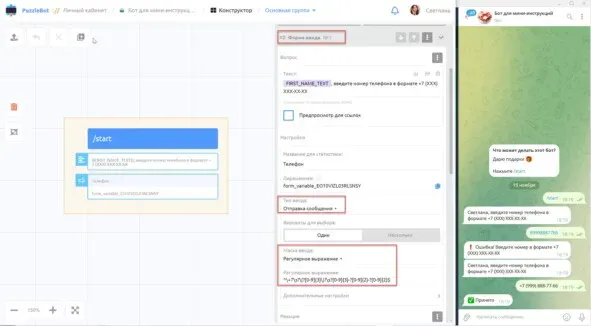
Validating a phone number with a regular expression
Step 2 — Set up date of birth validation
To make sure the date of birth is entered as DD.MM.YYYY, use this regular expression:
^(0[1-9]|[12][0-9]|3[01])\.(0[1-9]|1[0-2])\.(19|20)\d{2}$
Example: If the date is entered incorrectly, the bot will suggest: "Enter the date in the format DD.MM.YYYY".
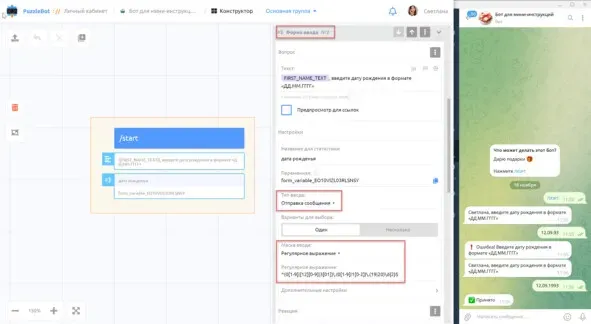
Validating a date of birth with a regular expression
Step 3 — Set up full name validation
To make sure the user enters their full name (last name, first name and patronymic) with capital letters and separates the words with spaces, use this regular expression:
^[А-ЯЁ][а-яё]+\s[А-ЯЁ][а-яё]+\s[А-ЯЁ][а-яё]+$
Example: If the full name is entered incorrectly, the bot will reply: "Enter your full name in the format Ivanov Ivan Ivanovich".
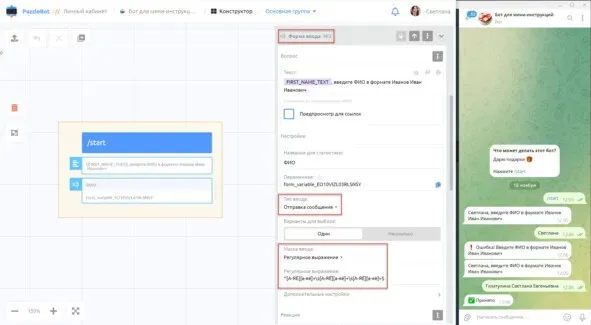
Validating a full name with a regular expression
Step 4 — Set up popular regular expressions for everyday use
Below are a few more regular expressions that can come in handy when working with chatbots, along with what each one is for.
1. Date validation (DD.MM.YYYY format)
^(0[1-9]|[12][0-9]|3[01])\.(0[1-9]|1[0-2])\.(19|20)\d{2}$
Description: Validates a date in day.month.year format, where the year starts with 19 or 20. Use it to validate a date of birth or any other date in this format.
2. Time validation (HH:MM format)
^([01][0-9]|2[0-3]):[0-5][0-9]$
Description: Checks that the time is entered in 24-hour format, from 00:00 to 23:59.
3. Russian tax ID (INN) validation (10 or 12 digits)
^\d{10}$|^\d{12}$
Description: Checks that the INN has either 10 or 12 digits, so it works for both individuals and legal entities.
4. Bank card number validation (XXXX-XXXX-XXXX-XXXX format)
^\d{4}-\d{4}-\d{4}-\d{4}$
Description: Validates a 16-digit bank card number with the digits separated by hyphens.
5. Postal code validation (Russia, 6 digits)
^\d{6}$
Description: Checks that the postal code has exactly six digits, as in the Russian format.
6. Passport validation (series and number: 4 digits + space + 6 digits)
^\d{4}\s\d{6}$
Description: Validates the series and number format of a Russian passport: a 4-digit series, a space and a 6-digit number.
7. URL validation
^(https?:\/\/)?(www\.)?[a-zA-Z0-9._-]+\.[a-zA-Z]{2,}\/?$
Description: Checks that the URL starts with "http://" or "https://" and includes a domain and, optionally, a subdomain.
Want to ask an expert a question? Leave it in the comments under the latest post in our channel — the most interesting ones will get a detailed breakdown.